
Minecraft Server Australia
  • 0 Shopping Cart
  • Home
  • Store
    • Browse All
    • Server Plans
  • Announcements
  • Knowledgebase
  • Network Status
  • Affiliates
  • Contact Us
  • More
  • Account
    • Login
    • Forgot Password?
  1. Portal Home
  2. Knowledgebase
  3. Billing
  4. How do I purchase additional servers?

  Categories

Billing
8
Common Issues
11
Server Management
35

  Categories

  Support

My Support Tickets
Announcements
Knowledgebase
Downloads
Network Status
Open Ticket

How do I purchase additional servers? Print

  • 3

To purchase additional servers, you will need to login to your client area account.

Login to the client area : https://clients.minecraftserver.com.au

Click on the Services drop down menu then click on Order New Services
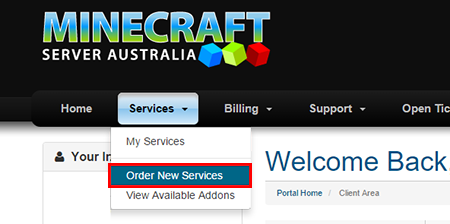
 
 
Order the service as usual and enter the name for the new server in the notes section.

We will email you the server login details and the server will then appear on your list of servers in your multicraft account.

Was this answer helpful?

Related Articles

Billing Payment Methods We offer 3 forms of payment through either Paypal, Credit Card or Bank Transfer.   You can... How to Cancel Your Minecraft Server To Cancel Your Minecraft Server and Services with us follow the steps below: Login to the client... How to cancel Paypal Recurring Payments When you submit a Cancellation request in our client area your paypal recurring billing will be... How to Upgrade or Downgrade your Minecraft Server Plan To Upgrade or Downgrade Your Minecraft Server Plan / Service:   Login to the client area :... How to Change Payment / Billing Method You can change the Payment / billing method you wish to use in the Client Area.First login to the...
« Back

  Support

My Support Tickets
Announcements
Knowledgebase
Downloads
Network Status
Open Ticket
  • Contact Us
  • Terms of Service

Copyright © 2026 Minecraft Server Australia. All Rights Reserved.


Loading...
Loading...

Generate Password

Please enter a number between 8 and 64 for the password length